
Modern Force Feedback
for Serious Sim Pilots.
Artisan-built, high-torque force feedback that transforms simulation from visual to physical: stall buffet, trim forces, and aerodynamic loading you feel through your hand.
Rhino FFB Base from €800 · DIY Kits from €179
Order Rhino Base
A ready-to-mount, plug-and-play FFB joystick base — everything assembled, tested, and shipped from our workshop
From €800
For BuildersOrder FFB Kits & Accessories
Motor control electronics and drive hardware for custom pedals, yokes, collectives, and modified sim hardware
Kits from €179
Firmware & Software
WebUSB firmware updates, configurator, and official manuals
Documentation
User manual, DIY community projects, third-party products, and troubleshooting guides
Modern Force Feedback for Serious Sim Pilots
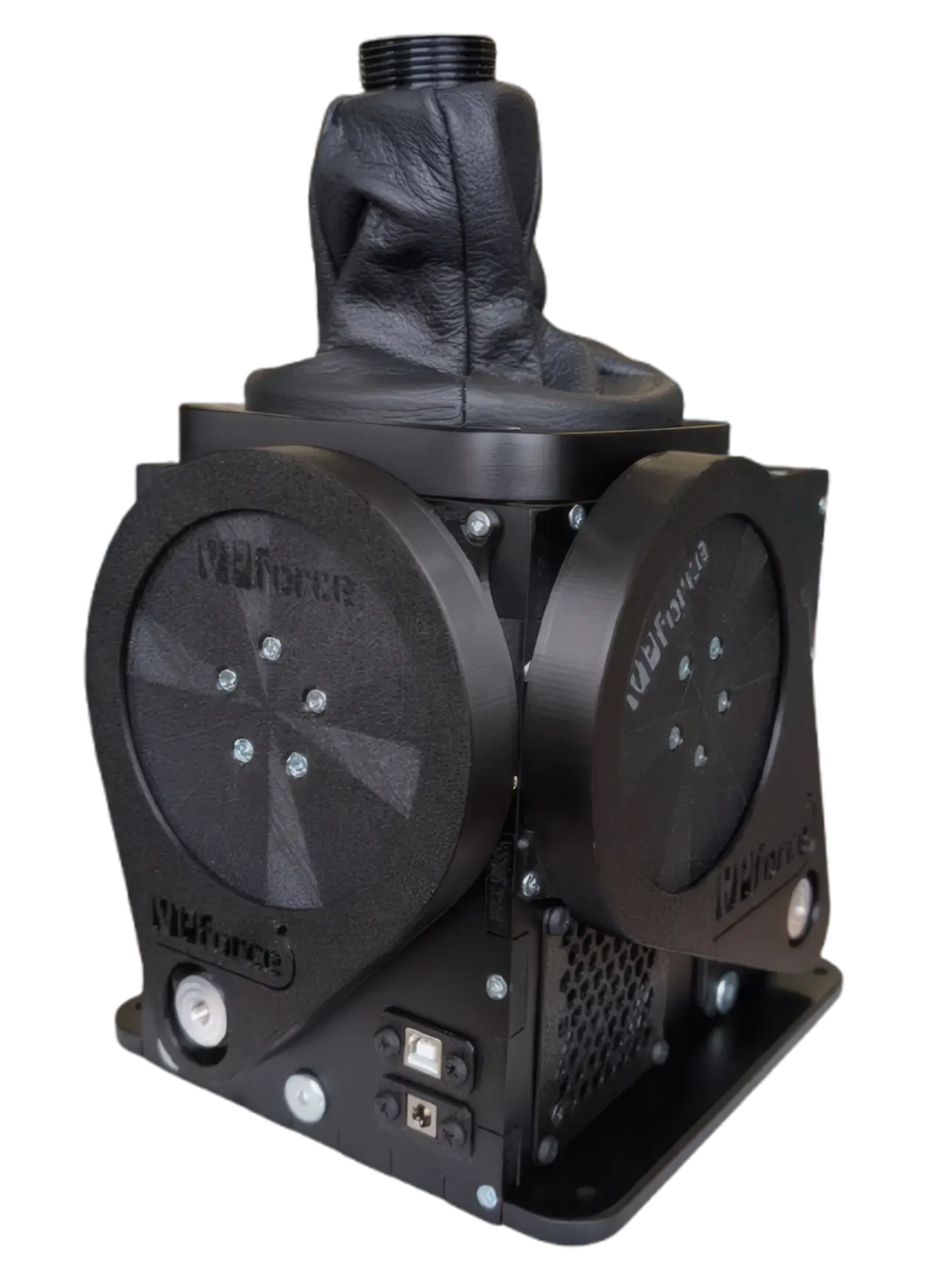
The VPforce Rhino delivers up to 9 Nm of torque with smooth, precise, zero-slop control and force feedback far beyond legacy mass-produced sticks. Hand-built for enthusiasts based on a refined open-source design, the Rhino transforms simulation from visual exercise to physical experience. Stall onset, trim motion, buffeting, and subtle aerodynamic cues come through sharply and consistently.
Windows recognizes the Rhino as a native FFB device. In simulators with built-in support like Condor and FFB-enabled aircraft in DCS, it works immediately. For simulators lacking native FFB, VPforce TelemFFB adds telemetry-driven effects for MSFS, X-Plane, IL-2, and Falcon BMS, producing trim feel, airframe loading, rotor dynamics, weapon recoil, and many other forces derived from real-time flight data.
VPforce Configurator writes settings directly to firmware: centering force, damping, friction, motor limits, travel adjustment, and multiple onboard profiles per aircraft. These adjustments run entirely on hardware with no background applications required.
Rhino FFB Base
A fully assembled, hand-crafted joystick base ready to mount on your rig. Connect power, USB, and your grip — nothing else required. Compatible with Thrustmaster, Virpil, VKB, and WinWing grips. Integrated cooling, 180W PSU included, configurable travel up to 44°.
- Plug-and-play — no assembly or wiring
- Built and tested in our Lithuanian workshop
- Rig, chair-side, or floor mount (not desktop)
- Up to 9 Nm torque, >5 kg base
DIY Motor Kits
Motor control electronics and belt-drive hardware for building any custom FFB control. The electrical engineering is solved — focus entirely on your mechanical design. Used to build custom pedals, yokes, collectives, and upgrades for existing hardware.
- Drop-in for MFG Crosswind, Thrustmaster TPR, Virpil pedals & more
- Same firmware and anti-cogging stack as the Rhino
- Active community with open-source build guides
- Kits available for one or two axes
The VPforce Story
VPforce Controls is an independent hardware workshop located in Klaipėda, Lithuania. The project began from a shared frustration within the sim community: simulators looked visually stunning, yet traditional spring-loaded joysticks left pilots feeling disconnected from the aircraft.
My name is Valmantas Palikša, known in the community as Walmis. As an embedded system engineer by trade, I wanted to build a way to physically feel the flight dynamics. What started as a personal mission to create an industrial-grade force feedback base quickly grew into a highly collaborative ecosystem. Today, alongside a small dedicated team, I hand-craft the Rhino FFB to bring authentic aerodynamic forces directly to your hands.
Community is at the core of everything we do. Beyond assembling complete bases, VPforce has proudly empowered a vibrant group of creators and makers. We provide the motor kits and open-source foundations for countless DIY projects, custom yokes, and pedal systems.
Since 2021, we have shipped our artisan-built systems to over 2,000 virtual pilots worldwide. We remain fully dedicated to industrial reliability, continuous innovation, and direct, personalized support.
What Pilots Are Saying
"It's like getting a cheat code to the Huey! Flying helos took on a whole new dimension. I can never go back."
"Dynamic forces tell you how the aircraft is doing. You feel the AoA, translational lift, and runway bumps. Game changing."
"Got the first public Rhino device almost exactly 2 years ago. Still running strong and precise. Flying DCS almost on a daily basis."
"It's seen pretty moderate to heavy regular use and I can tell you the build quality is great and it's holding up well."
"Amazing support. I had a bug, asked in the Discord, the creator instantly replied with troubleshooting tips, and fixed the bug."
"Super fast delivery! I ordered the 2 motors and main board… and they showed up at my door 3 days after I had ordered them."
"Did you guys know that many times dogfights are flown at the edge of the accelerated stall? The Rhino has this effect — you pull high Gs, the stick gets stiffer, and when you fire guns or take a hit, you feel it immediately. Warbirds deserve FFB — it makes them infinitely more realistic and completely changes how you manage the aircraft's limits."
— Real-World Aviator & Virtual Warbird Pilot★★★★★
"I would say on the immersion-adding scale, this base is on par with VR. Dynamic forces tell you exactly how the aircraft is doing — you can physically feel the Angle of Attack, the acceleration through translational lift, and the bumps in the runway. It's amazing being able to go from a cyclic with working force trim, to a warbird with cables, to a fly-by-wire jet without having to manually adjust springs or dampeners."
— Multi-Role DCS & MSFS Enthusiast★★★★★
Technical Specifications
Force & Physical
- Torque: Up to 9 Nm per axis
- Weight: >5 kg base
- Travel: Up to 44°
- Cooling: Dual-fan active
Grip Support
- Thrustmaster-style (direct)
- Virpil (direct): MongoosT-50, WarBRD, Alpha, Alpha Prime, VFX, AH-64, UH-60, FLNKR
- FC Technologies
- Custom Grips (via shift-register)
- VKB (via adapter)
- WinWing (via adapter)
Simulators
- DCS World
- Microsoft Flight Simulator
- X-Plane
- IL-2 Great Battles
- Falcon BMS
- Condor Soaring
Power & Mounting
- PSU: 180W (included)
- Mounting: Cockpit/rig required
- Not for desktop use
New to Force Feedback? Start Here
What Comes in the Kit?
The Rhino FFB base ships as a complete, ready-to-mount unit. Everything needed to connect and power the base is included.
Included in the box:
- Rhino FFB joystick base (fully assembled)
- 180W power supply with power cable
- USB cable (base to PC)
Also available from VPforce (order separately):
- Grip adapters for VKB and WinWing grips
- MonsterTech-compatible steel mounting plate (includes M5 bolts; works with MonsterTech aluminum frames or custom mounts)
- Throw limiter plates (reduce stick travel range for fighter-jet feel)
Not included — must order separately:
- Joystick grip — order from Thrustmaster, Virpil, VKB, or WinWing
- Grip extension (optional) — order from your grip manufacturer
- Mounting hardware — M5 bolts to attach the base to your rig (or use the optional VPforce mounting plate which includes them)
The Rhino is a base only — it provides the force feedback mechanism and electronics. A joystick grip is not part of the package and must be sourced separately.
Quick Start: What Else Do I Need?
To go from unboxing to flying, you need a few things beyond the Rhino base itself. Here's the complete picture:
Step 1 — Order from VPforce:
- Rhino FFB base (power supply and USB cable included)
- Grip adapter — required only if using a VKB or WinWing grip (Thrustmaster and Virpil grips mount directly, no adapter needed)
Step 2 — Order from a grip manufacturer:
- Joystick grip — choose one: Thrustmaster Warthog/Cougar, Virpil, VKB NXT/Gladiator, or WinWing
- Extension (optional) — for a taller stick position; buy from the same manufacturer as your grip
- VKB users only: also order the VKB black box controller — required for grip button/axis operation
Step 3 — Prepare your setup:
- Rigid mount — cockpit rig, chair-side mount, or floor mount; the Rhino weighs over 5 kg and cannot be used on a desktop
- Windows PC — one USB port and a standard power outlet
- Simulator — DCS, MSFS, X-Plane, IL-2, Falcon BMS, or Condor
Step 4 — Software (all free):
- VPforce Configurator — set spring force, damping, travel limits, and per-aircraft profiles; writes directly to firmware
- VPforce TelemFFB — adds telemetry-driven FFB effects for sims without native FFB support (MSFS, X-Plane, IL-2, Falcon BMS)
Basic setup (mount, attach grip, plug in cables, calibrate) takes around 15–30 minutes. Force feedback tuning is optional and done at your own pace.
Production & Shipping
Built to order: Each Rhino FFB is assembled and tested in our Klaipėda, Lithuanian workshop. Please allow 1-7 business days for production prior to shipment.
VPforce transit times (from Europe):
- USA: Typically under 7 days door-to-door (UPS, FedEx)
- Europe: 3-7 business days
- Canada/Australia/Asia: 7-14 business days
All orders include tracking. Customs duties/VAT may apply for non-EU destinations (buyer responsibility).
Important: These are VPforce processing and shipping times for the Rhino base and accessories only. If ordering grips or extensions from Virpil, VKB, Thrustmaster, or WinWing, check those manufacturers' separate shipping timelines.
Common Questions
Q: Can I use it on a desktop?
No. The Rhino requires rigid mounting to a cockpit, rig, or floor mount due to its weight (>5 kg) and high torque output.
Q: Does it work with my grip?
Thrustmaster and Virpil grips mount directly. VKB and WinWing require adapters (sold separately).
Q: Do I need special software?
No. The Rhino works as a native Windows FFB device. VPforce Configurator (free) adjusts settings. TelemFFB (free) adds effects for sims without native FFB.
Q: Is it difficult to set up?
Basic setup takes 15-30 minutes: mount base, attach grip, connect cables, calibrate axes. Fine-tuning force feedback settings is optional and done through software.
Frequently Asked Questions
What is the warranty and support policy?
Every fully assembled Rhino FFB base is built with industrial-grade components and comes with a 1-year warranty against manufacturing defects. If you ever need help, we offer direct, one-on-one troubleshooting through our active Discord support channel.
Can the Rhino damage my grip or other hardware?
The Rhino is designed for standard flight sim grips and poses no risk to properly installed equipment. The emergency stop button provides immediate motor cutoff if needed. Follow installation instructions carefully, particularly when mounting grips with extensions.
How loud is the Rhino during operation?
Motor noise is minimal during normal operation. Cooling fans activate when motors reach 50°C and produce moderate noise comparable to a laptop fan. Most users report the Rhino is quieter than expected for a high-torque FFB system.
Do I need to buy a grip and extension separately?
Yes. The Rhino base does not include a joystick grip. You must purchase a compatible grip separately from manufacturers like Virpil, VKB, Thrustmaster, or WinWing. Extensions (for taller stick mounting) are also purchased separately from the same grip manufacturers, not from VPforce. VPforce provides the base and adapters; grip manufacturers provide grips and extensions.
Can I share or download force feedback profiles?
Profile sharing is uncommon in the Rhino community due to hardware diversity (DIY builds, different grips, extension lengths, mounting styles). A profile optimized for one setup often doesn't transfer well to another. We recommend building your own baseline configuration using the Configurator software, starting with damping, inertia, and spring force before adding telemetry effects.
What maintenance does the Rhino require?
Minimal routine maintenance: occasional belt tension checks, bearing inspection, and cleaning dust from cooling vents. Belts may need replacement after extended heavy use (typically years). Detailed maintenance procedures are in the documentation.
Does the Rhino work with game controllers or console systems?
No. The Rhino is designed exclusively for Windows PCs and requires DirectX Force Feedback API support. It does not work with Xbox, PlayStation, or generic game controller interfaces.
Can I upgrade or modify my Rhino later?
Yes. Firmware updates are delivered via WebUSB. Mechanical modifications include adding throw limiters, extensions, or different grips. The VPforce community has extensive DIY documentation for custom modifications and builds using VPforce motor kits.
Discord — Primary Support Channel
The fastest way to get help is on Discord. Our community and the VPforce team are active daily — most questions get answered within hours. Browse the existing channels, ask in #support, and connect with hundreds of Rhino pilots worldwide.
